

MPI 并行指南
MPI是一个跨平台的通信协议,用于编写并行计算机,支持点对点和广播。MPI是一个信息传递应用程序接口,包括协议和语义说明,他们指明其如何在各种实现中发挥其特性。MPI的目标是高性能,大规模性和可移植性。MPI在今天仍为高性能计算的主要模型。
MPI 是一个跨语言的通讯协议,用于编写并行计算机。支持点对点和广播。MPI 是一个信息传递应用程序接口,包括协议和和语义说明,他们指明其如何在各种实现中发挥其特性。MPI的目标是高性能,大规模性,和可移植性。MPI 在今天仍为高性能计算的主要模型。
MPI 可以大概分为两大类:Open MPI 和 MPICH 及其衍生。
MPICH 实现的比较全面,但是不支持 InfiniBand 这种比较新的硬件和协议。但是它的衍生品例如 Intel MPI 和 MVAPICH 支持比较新的硬件与协议。
Open MPI 也实现了 MPI 标准,并且应用广泛。它的进程管理比 MPICH 相对比较好。
Open MPI 与 OpenMP 是不同的概念。
1、Hello world 代码案例
让我们来看一下这节课的代码吧,完整的代码在 mpi_hello_world.c。 下面是一些重点内容的摘录。
#include <mpi.h>#include <stdio.h>
int main(int argc, char** argv) { // 初始化 MPI 环境 MPI_Init(NULL, NULL);
// 通过调用以下方法来得到所有可以工作的进程数量 int world_size; MPI_Comm_size(MPI_COMM_WORLD, &world_size);
// 得到当前进程的秩 int world_rank; MPI_Comm_rank(MPI_COMM_WORLD, &world_rank);
// 得到当前进程的名字 char processor_name[MPI_MAX_PROCESSOR_NAME]; int name_len; MPI_Get_processor_name(processor_name, &name_len);
// 打印一条带有当前进程名字,秩以及 // 整个 communicator 的大小的 hello world 消息。 printf("Hello world from processor %s, rank %d out of %d processors\n", processor_name, world_rank, world_size);
// 释放 MPI 的一些资源 MPI_Finalize();}你应该已经注意到搭建一个 MPI 程序的第一步是引入 #include <mpi.h> 这个头文件。然后 MPI 环境必须以以下代码来初始化:
MPI_Init(int* argc, char*** argv)在 MPI_Init 的过程中,所有 MPI 的全局变量或者内部变量都会被创建。举例来说,一个通讯器 communicator 会根据所有可用的进程被创建出来(进程是我们通过 mpi 运行时的参数指定的),然后每个进程会被分配独一无二的秩 rank。当前来说,MPI_Init 接受的两个参数是没有用处的,不过参数的位置保留着,可能以后的实现会需要用到。
在 MPI_Init 之后,有两个主要的函数被调用到了。这两个函数是几乎所有 MPI 程序都会用到的。
MPI_Comm_size( MPI_Comm communicator, int* size)MPI_Comm_size 会返回 communicator 的大小,也就是 communicator 中可用的进程数量。在我们的例子中,MPI_COMM_WORLD(这个 communicator 是 MPI 帮我们生成的)这个变量包含了当前 MPI 任务中所有的进程,因此在我们的代码里的这个调用会返回所有的可用的进程数目。
MPI_Comm_rank( MPI_Comm communicator, int* rank)MPI_Comm_rank 这个函数会返回 communicator 中当前进程的 rank。 communicator 中每个进程会以此得到一个从0开始递增的数字作为 rank 值。rank 值主要是用来指定发送或者接受信息时对应的进程。
我们代码中使用到的一个不太常见的方法是:
MPI_Get_processor_name( char* name, int* name_length)MPI_Get_processor_name 会得到当前进程实际跑的时候所在的处理器名字。 代码中最后一个调用是:
MPI_Finalize 是用来清理 MPI 环境的。这个调用之后就没有 MPI 函数可以被调用了。
2、运行 MPI hello world 程序
现在查看以下代码文件以及代码所在的文件夹,你会看到一个 makefile。
>>> git clone https://github.com/mpitutorial/mpitutorial>>> cd mpitutorial/tutorials/mpi-hello-world/code>>> cat makefileEXECS=mpi_hello_worldMPICC?=mpicc
all: ${EXECS}
mpi_hello_world: mpi_hello_world.c ${MPICC} -o mpi_hello_world mpi_hello_world.c
clean: rm ${EXECS}我的 makefile 会去找 MPICC 这个环境变量。如果你把 MPICH2 装在了本地文件夹里面而不是全局 PATH 下面, 手动设置一下 MPICC 这个环境变量,把它指向你的 mpicc 二进制程序。mpicc 二进制程序其实只是对 gcc 做了一层封装,使得编译和链接所有的 MPI 程序更方便。
>>> export MPICC=/home/kendall/bin/mpicc>>> make/home/kendall/bin/mpicc -o mpi_hello_world mpi_hello_world.c当你的程序编译好之后,它就可以被执行了。不过执行之前你也许会需要一些额外配置。比如如果你想要在好几个节点的集群上面跑这个 MPI 程序的话,你需要配置一个 host 文件(不是 /etc/hosts)。如果你在笔记本或者单机上运行的话,可以跳过下面这一段。
需要配置的 host 文件会包含你想要运行的所有节点的名称。为了运行方便,你需要确认一下所有这些节点之间能通过 SSH 通信,并且需要根据设置认证文件这个教程配置不需要密码的 SSH 访问。 我的 host 文件看起来像这样:
>>> cat host_filecetus1cetus2cetus3cetus4为了用我提供的脚本来运行这个程序,你应该设置一个叫 MPI_HOSTS 的环境变量,把它指向 host 文件所在的位置。我的脚本会自动把这个 host 文件的配置项加到 MPI 启动命令里。如果单机跑的话就不用设置这个环境变量。另外如果你的 MPI 没有装到全局环境的话,你还需要指定 MPIRUN 这个环境变量指向你的 mpirun 二进制程序。
准备就绪之后你就可以使用这个项目的我提供的 python 脚本来执行程序。脚本在 tutorials 目录下面,这个脚本可以用来跑我们这个教程里面提到的所有程序(而且它会帮你先编译一下程序)。你可以在 mpitutorial 这个文件夹的根目录下执行以下命令:
>>> export MPIRUN=/home/kendall/bin/mpirun>>> export MPI_HOSTS=host_file>>> cd tutorials>>> ./run.py mpi_hello_world/home/kendall/bin/mpirun -n 4 -f host_file ./mpi_hello_worldHello world from processor cetus2, rank 1 out of 4 processorsHello world from processor cetus1, rank 0 out of 4 processorsHello world from processor cetus4, rank 3 out of 4 processorsHello world from processor cetus3, rank 2 out of 4 processors跟预想的一样,这个 MPI 程序运行在了我提供的所有节点上面。每个进程都被分配了一个单独的 rank,跟进程的名字一起打印出来了。你可以看到,在我们的输出的结果里,进程之间的打印顺序是任意的,因为我们的代码里并没有涉及到同步的操作。
我们可以在打印的内容上面那条看到脚本是如何调用 mpirun 这个程序的。mpirun 是 MPI 的实现用来启动任务的一个程序。进程会在 host 文件里指定的所有机器上面生成,MPI 程序就会在所有进程上面运行。我的脚本自定地提供了一个 -n 参数告诉 MPI 程序我要运行 4 个进程。你可以试着修改脚本来使用更多进程运行 MPI 程序。当心别把你的操作系统玩崩了。:-)
你可能会问,“我的节点都都是双核的机器,我怎么样可以让 MPI 先在每个节点上的每个核上生成进程,再去其他的机器?” 其实方案很简单。修改一下你的 host 文件,在每个节点名字的后面加一个冒号和每个处理器有的核数就行了。比如,我在 host 文件里指定我的每个节点有2个核。
>>> cat host_filecetus1:2cetus2:2cetus3:2cetus4:2当我再次运行我的脚本,哇!,MPI 任务只在我的两个节点上生成了4个进程。
>>> ./run.py mpi_hello_world/home/kendall/bin/mpirun -n 4 -f host_file ./mpi_hello_worldHello world from processor cetus1, rank 0 out of 4 processorsHello world from processor cetus2, rank 2 out of 4 processorsHello world from processor cetus2, rank 3 out of 4 processorsHello world from processor cetus1, rank 1 out of 4 processors3、进阶MPI编程
3.1、MPI初始化
#include "mpi.h"#include <stdio.h>int main(int argc, char* argv[]){//=========================================================// MPI Indix// ======================================================= int myid,numprocs,namelen; char processor_name[MPI_MAX_PROCESSOR_NAME]; // Basic MPI MPI_Init(&argc,&argv); MPI_Comm_rank(MPI_COMM_WORLD,&myid); // rank id MPI_Comm_size(MPI_COMM_WORLD,&numprocs); // total rank MPI_Get_processor_name(processor_name,&namelen); // get the meachine name if(myid==0) printf("Number of MPI thread is %d\n",numprocs); MPI_Finalize();}在这段代码里,有几句比较重要:
MPI_Init(NULL, NULL)在这一句之前,所有的进程都是完全相互独立的。MPI_COMM_WORLD是预定义好的通信器 (Communicator),通信器是一个包含了进程的集合,同一个通信器里面的进程可以相互通信。MPI_Comm_rank(MPI_COMM_WORLD, &world_rank)获取每个进程的在通信器里面的 Rank,也就是编号MPI_Finalize()这一句释放掉所有被 MPI 占用的资源。- 实际上 MPICC 的后端还是 GCC。MPICC 只是添加了动态链接库。
3.2、进程间通讯
3.2.1、P2P 接收与发送
-
MPI_Send用来发送信息 -
MPI_Recv用来接收信息int MPI_Send(void *buf, int count, MPI_Datatype datatype, int dest, int tag, MPI_Comm comm);int MPI_Recv(void *buf, int count, MPI_Datatype datatype, int source, int tag, MPI_Comm comm, MPI_Status *status);
参数说明
buf内存地址,用于接收/发送消息的存储。count传送消息的数量datatype传输数据类型,除了 C 自带的类型以外,MPI 还定义了一些类型dest接收节点source发送节点tag信息的标签comm通信器status接收消息的状态
传递信息可以看作是一个 Message Envelope.每个 Send 要确保有对应的 Recv。除此以外,还要注意死锁问题,每个 Recv 都能即使获取到发送的东西。
值得一提的是,接收消息的长度跟发送消息的长度是可以不同的,但是最好保证接收消息的长度 大于等于 发送的长度,以免溢出。
#include <stdio.h>#include <mpi.h>#include <stdlib.h>
int main(int argc, char *argv[]) { MPI_Init(&argc, &argv); int numP, myId; MPI_Comm_rank(MPI_COMM_WORLD, &myId); MPI_Comm_size(MPI_COMM_WORLD, &numP);
if(numP % 2 != 0) { if(!myId) { printf("ERROR: the number of ping-pong processors must be even number!\n"); } MPI_Abort(MPI_COMM_WORLD, EXIT_FAILURE); }
int partner_id; int odd = myId & 1;
if(odd) { partner_id = myId - 1; } else { partner_id = myId + 1; }
int a, b; if(odd == 0) { a = -1; printf("Process %d sends token %d to process %d\n", myId, a, partner_id); MPI_Send(&a, 1, MPI_INT, partner_id, 0, MPI_COMM_WORLD);
MPI_Recv(&b, 1, MPI_INT, partner_id, 0, MPI_COMM_WORLD, MPI_STATUS_IGNORE); printf("Process %d receives token %d from process %d\n", myId, b, partner_id); } else { a = 1; MPI_Recv(&b, 1, MPI_INT, partner_id, 0, MPI_COMM_WORLD, MPI_STATUS_IGNORE); printf("Process %d receives token %d from process %d\n", myId, b, partner_id);
printf("Process %d sends token %d to process %d\n", myId, a, partner_id); MPI_Send(&a, 1, MPI_INT, partner_id, 0, MPI_COMM_WORLD); }
MPI_Finalize();}Result
Process 2 sends token -1 to process 3Process 0 sends token -1 to process 1Process 1 receives token -1 from process 0Process 1 sends token 1 to process 0Process 0 receives token 1 from process 1Process 3 receives token -l from process 2Process 3 sends token 1 to process 2Process 2 receives token 1 from process 33.2.2 阻塞通信与非阻塞通信
刚才说的是阻塞通信,在发送出去/接收到之前,程序会停止运行。相对的,也存在非阻塞通信。如下:
-
MPI_ISend用来发送信息 -
MPI_IRecv用来接收信息int MPI_ISend(void *buf, int count, MPI_Datatype datatype, int dest, int tag, MPI_Comm comm, MPI_Request *request);int MPI_IRecv(void *buf, int count, MPI_Datatype datatype, int source, int tag, MPI_Comm comm, MPI_Request *request);
request 用于标记通信任务。在使用非阻塞通信传来的数据之前,需要使用 MPI_Wait 确认是否数据已经传入缓冲区。
非阻塞通信还有如下的控制与测试函数:
MPI_Cancel用于取消非阻塞通信。MPI_Test用于测试非阻塞通信是否已经结束。MPI_Wait用于等待非阻塞通信数据。
#include <stdio.h>#include <mpi.h>#include <stdlib.h>
int main(int argc, char *argv[]) { MPI_Init(&argc, &argv); int numP, myId; MPI_Comm_rank(MPI_COMM_WORLD, &myId); MPI_Comm_size(MPI_COMM_WORLD, &numP);
int next_id = (myId + 1) % numP, prev_id = (myId - 1 + numP) % numP; MPI_Request rq_send, rq_recv;
int a = 1, b; MPI_Isend(&a, 1, MPI_INT, next_id, 0, MPI_COMM_WORLD, &rq_send); MPI_Irecv(&b, 1, MPI_INT, prev_id, 0, MPI_COMM_WORLD, &rq_recv); MPI_Wait(&rq_recv, MPI_STATUS_IGNORE); printf("%d receive token %d from %d\n" myId, b, prev_id); MPI_Barrier(MPI_COMM_WORLD);
a = -1; MPI_Isend(&a, 1, MPI_INT, prev_id, 0, MPI_COMM_WORLD, &rq_send); MPI_Irecv(&b, 1, MPI_INT, next_id, 0, MPI_COMM_WORLD, &rq_recv); MPI_Wait(&rq_recv, MPI_STATUS_IGNORE); printf("%d receive token %d from %d\n" myId, b, next_id); MPI_Barrier(MPI_COMM_WORLD);
MPI_Finalize();}结果
5 receive token 1 from 46 receive token 1 from 54 receive token 1 from 31 receive token 1 from 00 receive token 1 from 62 receive token 1 from 13 receive token 1 from 21 receive token -1 from 24 receive token -1 from 50 receive token -1 from 16 receive token -1 from 05 receive token -1 from 63 receive token -1 from 42 receive token -1 from 33.2.3 聚合通信 (Collective Communication)
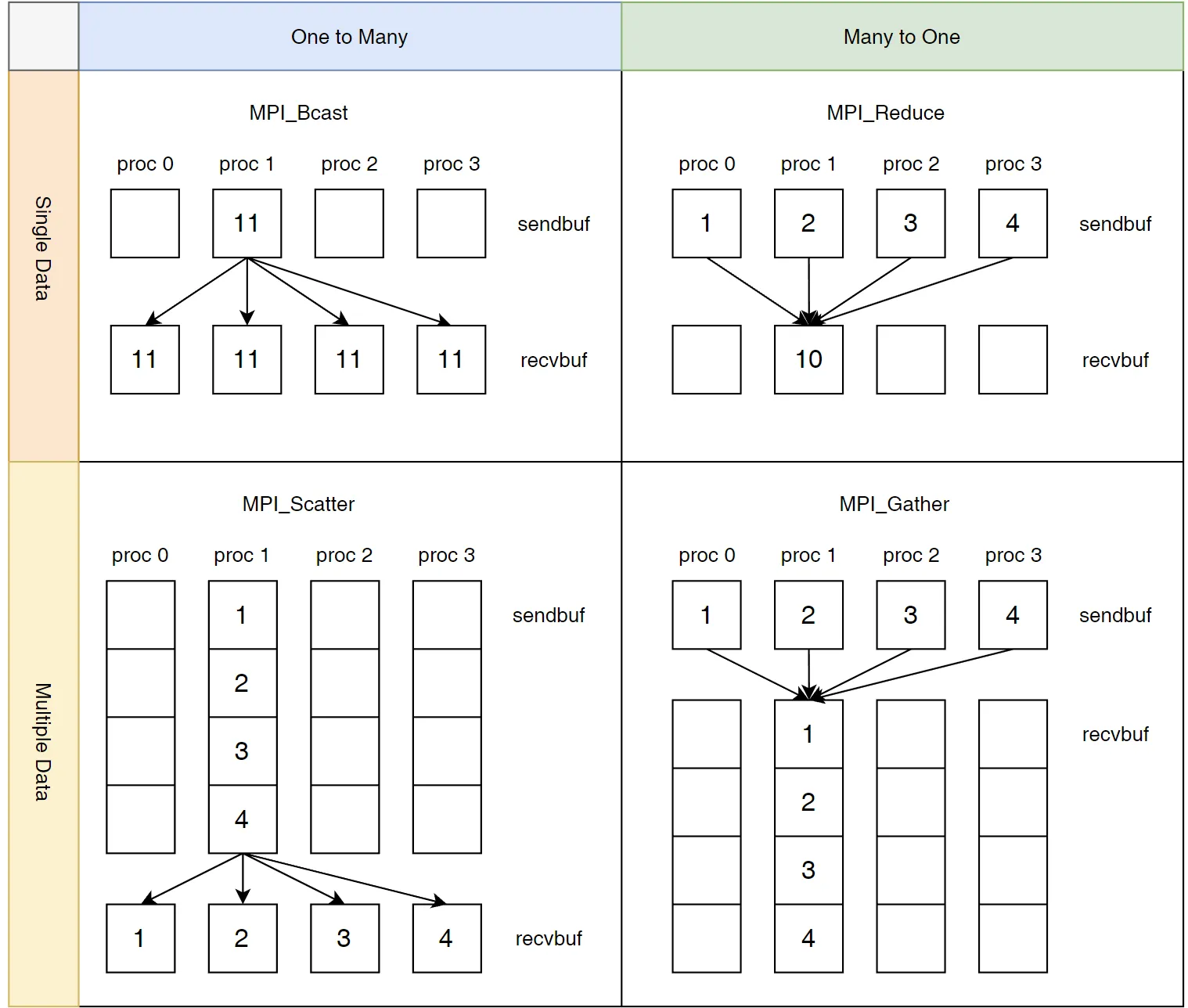
除了点对点通信之外,MPI 还有其他的通信方式如图所示。
#include <stdio.h>#include <mpi.h>#include <stdlib.h>
int main(int argc, char *argv[]) { MPI_Init(&argc, &argv); int numP, myId; MPI_Comm_rank(MPI_COMM_WORLD, &myId); MPI_Comm_size(MPI_COMM_WORLD, &numP);
int n = atoi(argv[1]) MPI_Barrier(MPI_COMM_WORLD);
double start = MPI_Wtime();
int myCount = 0; int total; int prime;
for(int i = 2 + myId; i <= n; i += numP) { prime = 1; for(int j = 2; j < i; ++j) { if(i % j == 0) { prime = 0; break; } } myCount += prime; }
MPI_Reduce(&myCount, &total, 1, MPI_INT, MPI_SUM, 0, MPI_COMM_WORLD);
double end = MPI_Wtime(); if(!myId) { printf("%d primes between 1 and %d\n", total, n); printf("Time with %d processes: %.3lf seconds\n", numP, end - start); } MPI_Finalize();}MPI_Reduce 中有预定义好的 MPI_Ops 例如 MPI_MAX, MPI_SUM 等等。
mpirun -np 10 ./prime 100000
9592 primes between 1 and 100000Time with 10 processes: 0.265 secondsmpirun -np 1 ./prime 100000
9592 primes between 1 and 100000Time with 1 processes: 1.012 seconds
Reference
【1】 https://mpitutorial.com/tutorials/mpi-hello-world/zh_cn/
【2】MPI Hello World · MPI Tutorial
【3】MPI编程入门(Fortran) (cndaqiang.github.io)
【4】cnblogs.com/zhangyazhou/p/13376262.html
【5】https://jinbridger.github.io/docs/hpc/openmpi-programming-101/